
- Very fast onboarding for small teams
- Clear dashboards on PM compliance and backlog
- Mobile app is friendly for field technicians

Limble CMMS
Easy CMMS for growing teams
SF8.6
SF Score editorial score across features, ease, and value, based on public reviews and product research. Learn more →
Move off paper and spreadsheetsmobile work orderspreventive maintenance
Move off paper and spreadsheetsmobile work orders
Best for
Small and mid-sized maintenance teams
Pricing
Free tier available
Free plan
Available
SoftFinders Score
8.6 / 10
Overview
What is Limble CMMS?
Limble CMMS is cloud-based maintenance management software for teams responsible for equipment and facilities, combining work orders, preventive maintenance, asset records, spare-parts inventory, maintenance requests, reporting, purchasing, and mobile field work.
- Maintenance workflow: teams can create, assign, prioritize, and track work orders; automate preventive maintenance using calendar, usage, meter, or threshold-based schedules; and accept maintenance requests through shareable portals and QR codes. Asset records connect open and completed work, PMs, associated parts, vendors, activity logs, and asset-level reporting in one place.
- AI-powered PM Builder: Limble’s PM Builder uses equipment manuals—either selected from its manufacturer/model library or uploaded as machine-readable PDFs—to suggest preventive-maintenance templates based on asset type, usage, and operating environment. It can generate the PM name, schedule, and checkbox instructions, but users are expected to verify the output and manually configure assignments, tags, descriptions, parts, and tools.
- Mobile and offline work: technicians can create and complete work orders, access asset and parts records, submit requests, and scan QR codes from mobile devices. Offline mode supports pre-synced open or in-progress tasks, including instructions, time logging, notes, photos, and files, then synchronizes changes when connectivity returns; some functions such as creating new unopened work, changing assignments, or browsing full asset and inventory records remain unavailable offline.
- Commercial considerations: Limble currently maintains Basic, Standard, Premium+, and Enterprise account paths. Basic and Standard customers generally use self-onboarding, while Premium+ and Enterprise customers can work with a Customer Success Manager on guided implementation. Enterprise customers receive custom quotes based on license volume and organizational requirements, with more advanced controls and workflows available at that level.
Limble is most relevant to maintenance and facilities teams that want straightforward work-order and preventive-maintenance workflows, strong mobile execution, QR-based access, and the ability to add more advanced inventory, automation, purchasing, and enterprise controls as their maintenance operation grows.
KEY FEATURES
What you get out of the box
Easy Setup
Quick onboarding and clean default workflows
Work Orders
Create assign and complete maintenance tasks
PM Templates
Reusable preventive maintenance plan templates
Asset History
Records work failures costs and downtime
Mobile App
Field-friendly app for technicians and supervisors
Dashboards
KPIs on compliance backlog and labor
USE CASES
Where teams put it to work
Move off paper and spreadsheets
Run preventive maintenance programs
Coordinate small maintenance teams
Track asset history clearly
Improve PM compliance fast
Report maintenance KPIs regularly
Editorial Take
What we like, and what to verify
- Less depth for complex enterprise asset trees
- Advanced analytics weaker than enterprise EAM platforms
- Higher tiers needed for some richer features
Screenshots
A look inside
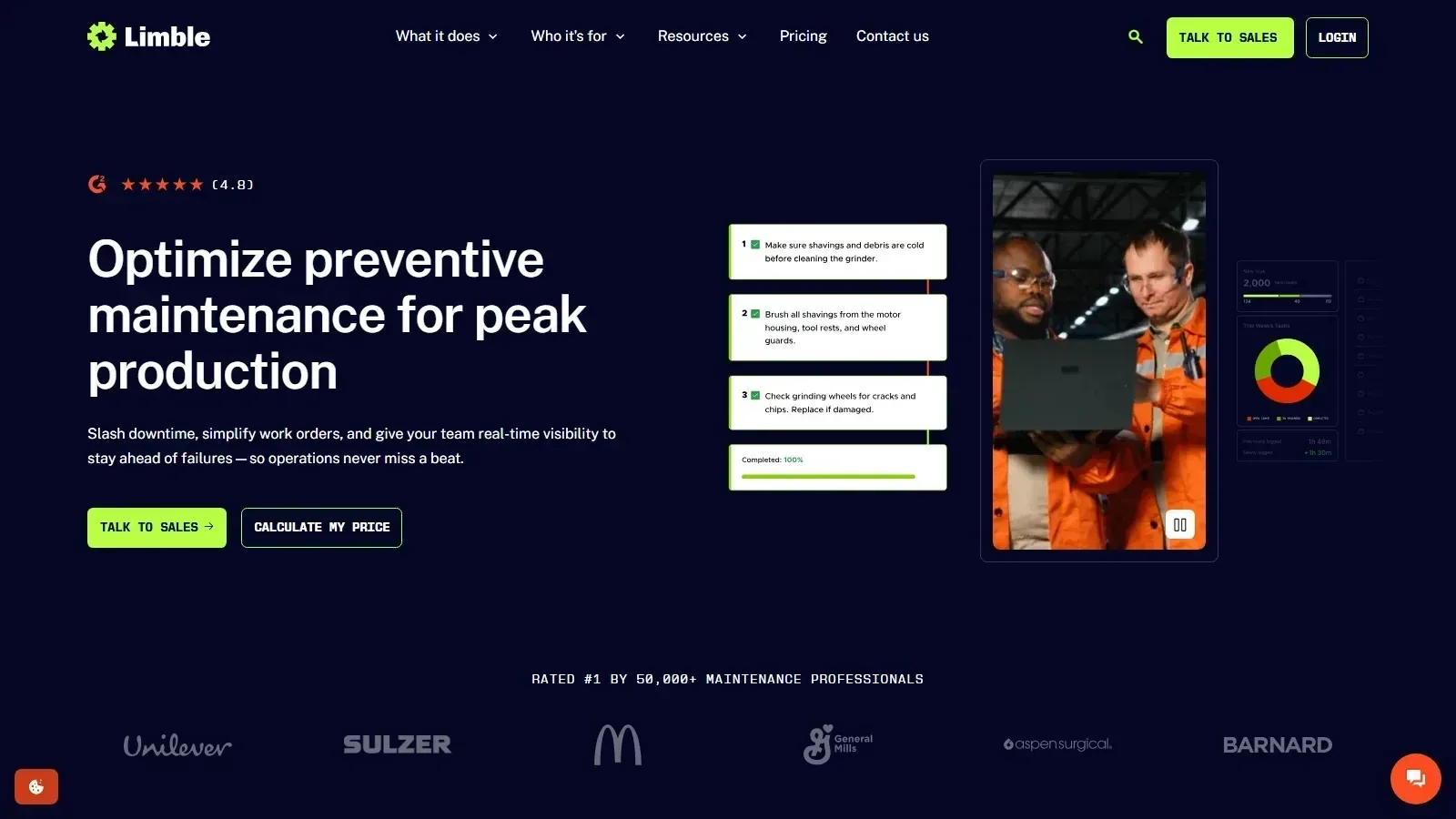 Limble CMMS homepage screenshot
Alternatives
Tools to consider next

UpKeep SF 8.4
Why consider it
Mobile CMMS for maintenance teams

eMaint SF 8.32
Why consider it
Configurable CMMS for industrial maintenance
Fiix SF 8.54
Why consider it
Cloud CMMS with strong analytics

Fracttal One SF 8.13
Why consider it
Cloud CMMS with IoT support

MaintainX SF 8.5
Why consider it
Digital work orders and procedures

Odoo Maintenance SF 7.4
Why consider it
Maintenance module inside Odoo ERP
USER REVIEWS
Limble CMMS Reviews
Published user reviews are moderated and kept separate from the SoftFinders Score.
No published reviews yet.
Reviews from real users will appear here once published.
Used Limble CMMS?
Share your experience with other buyers.
FAQ